

IPTV Architecture for Non-Technical Users Explained 2026
Understanding IPTV Architecture for Non-Technical Users
Understanding how modern-day television works can feel overwhelming. Many people use streaming services every day without knowing what happens behind the screen. This guide will break down IPTV architecture for non-technical users so you can understand the journey of a video signal from the source to your living room.
Television has evolved from giant antennas to digital streams. Today, we use the internet to send and receive high-quality video data. This method relies on a specific structure that ensures the video plays smoothly without interruptions. By learning about this setup, you can make better choices about the tools and services you use at home.
What Is an IPTV Reseller Panel?
It is a centralized management interface that allows an IPTV reseller to manage user access, monitor connections, and handle technical support for a specific group of subscribers.
The Core Components of IPTV Architecture
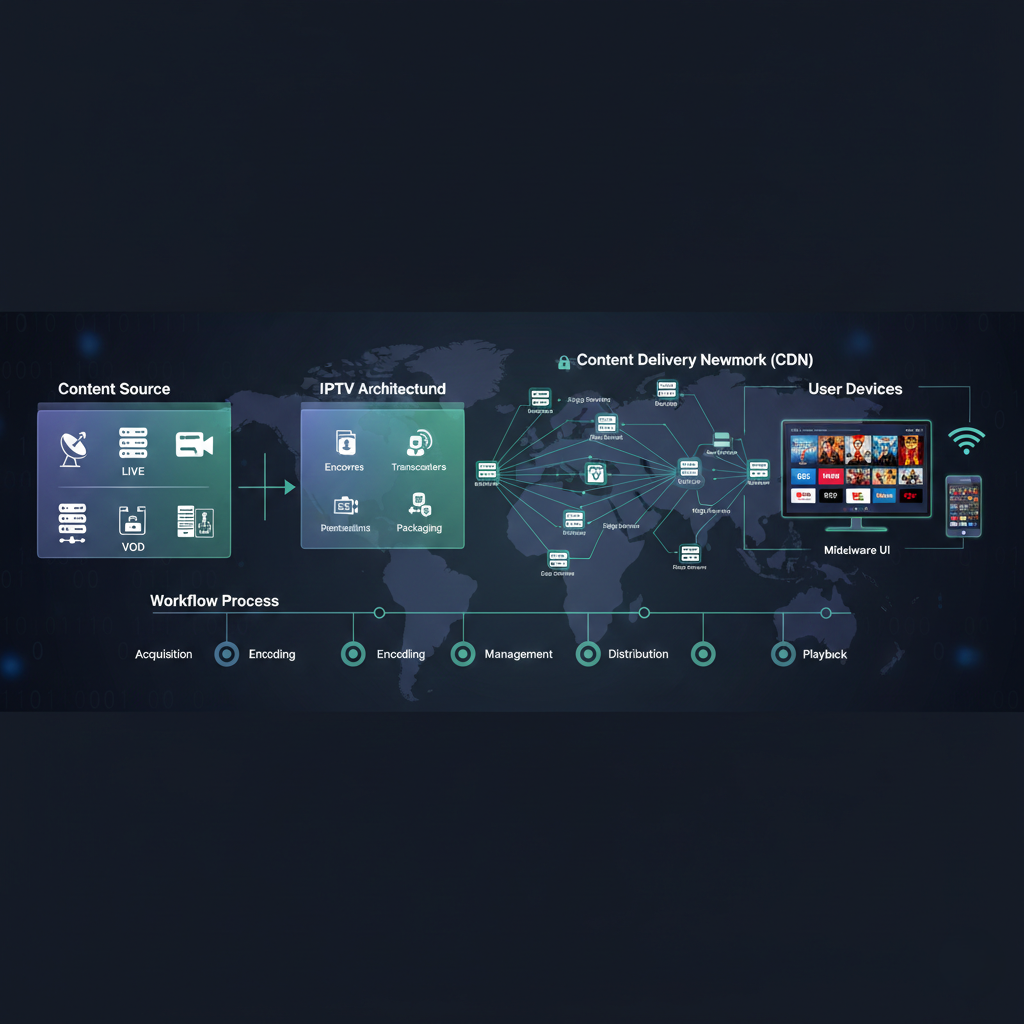
Think of IPTV like a water delivery system. You have a large reservoir, a series of pipes, and eventually, the tap in your kitchen. In the world of digital TV, these elements have specific names.
- The Content Source
Everything starts with the content. This could be a live football game, a news broadcast, or a movie saved on a hard drive. This raw video is usually too large to send over the internet directly. It must be organized first.
- The Headend
The headend is the “brain” of the operation. It takes those signals and converts them into a digital format that the internet can understand. This process is called “encoding.”
- The Delivery Network
Once the video is encoded, it needs to travel to your house. This happens via the Content Delivery Network (CDN). A CDN is a network of servers positioned all around the country. Instead of every user connecting to one single computer, they connect to the server closest to them. This prevents the system from crashing and reduces lag.
- The User Device
This is the “tap” where the video ultimately comes out. Your smart TV, phone, or laptop receives the data packets. It then “decodes” them, turning those bits of data back into the pictures and sounds you enjoy.
How Data Travels: A Step-by-Step Workflow
To better understand IPTV architecture for non-technical users, it helps to follow the path of a single stream.
Processing and Delivery Table
Stage 1 — Acquisition: Live signals are captured from satellites or studios.
Stage 2 — Encoding: The video is compressed into a smaller, digital size.
Stage 3 — Management: Middleware organizes the channels and user accounts.
Stage 4 — Distribution: The internet carries the data packets to the user’s home.
Stage 5 — Playback: The device converts data into a viewable video stream.
Why Architecture Matters for Quality
If the architecture is weak, your viewing experience may be poor. You might see “buffering” circles or blurry pictures. A strong structure uses excellent servers and efficient management software.
Professional management tools are essential for keeping these structures organized. If you are researching costs for these control tools, you can often find information on a dedicated pricing page provided by software developers. These pages help you understand the investment needed for reliable streaming infrastructure.
The Role of Middleware
Middleware is the “operating system” of the TV experience. It is the software that shows you the channel list, the movie posters, and the search bar. Without middleware, you’ll just have a list of messy web links. Middleware makes the technology feel like a real television service.
Benefits of Modern Architecture
Moving away from old cable systems offers several advantages. Because the system is built on internet protocols, it is far more flexible.
Pros vs Cons of Internet-Based Architecture
| Feature | Benefits | Drawbacks |
|---|---|---|
| Interactivity | You can pause, rewind, and record easily. | Can be complex for beginners to set up. |
| Scalability | Thousands of people can watch at once. | Requires a high-speed internet connection. |
| Portability | Watch on any device with an internet link. | Data usage can be high on mobile plans. |
| Updates | Features can be added through software updates. | Old hardware may become outdated quickly. |
Common Misconceptions About the Technology
Because this technology is still relatively new to many, there are several myths that need to be cleared up.
“It’s the same as a website”
While both use the internet, IPTV is much more complex. A website usually just sends you a file. IPTV has to deliver a steady, timed stream of data. If one “packet” of data arrives late, the video freezes. This is why specialized architecture is required.
“More channels means better architecture”
The number of channels has nothing to do with the quality of the system. A system with five channels can have better architecture than one with five thousand. Quality is about the stability of the servers and the speed of the delivery network.
“It is always illegal”
This is a major misunderstanding. This article is about the software, management tools, and technical delivery of video. We do not host or provide any illegal content. Many well-known, legitimate businesses like YouTube TV and Hulu use this exact same structure to deliver their services.
Best Practices for a Better Experience
To get the most out of this technology, you should follow these simple steps at home.
Use an Ethernet Cable: Wi-Fi can be unreliable. Plugging your TV directly into the router ensures a steady flow of data.
Keep Your Device Clean: Close apps you aren’t using. This gives your TV more power to focus on the video stream.
Check Your Bandwidth: Ensure no one else in the house is doing heavy downloads while you are trying to watch a high-definition stream.
Update Your Software: Developers frequently release updates to make the “decoding” process faster and more secure.
Comparing Home Setups
Not every home uses the technology in the same way. Some people prefer a dedicated box, while others choose using an app on their phone.
User Setup Comparison Table
| Setup type | Best for | Ease of use |
|---|---|---|
| Smart TV App | Casual viewers who want a clean look. | Very Easy |
| Android Box | Power users who want many features. | Moderate |
| Smartphone | People who travel or commute. | Easy |
| PC / Laptop | Students or office workers. | Moderate |
The Role of Management Software
For those interested in the backend, management software is the glue that holds everything together. If a server goes down, the management software can automatically move users to a different server. This is called “redundancy.” It is an important part of a professional setup. This is often why people look into becoming an IPTV UK reseller, as they can use these professional panels to provide a reliable experience to others.
Frequently Asked Questions
Does IPTV require a specific type of internet?
No, it works with any standard high-speed internet connection. However, fibre or cable internet is typically the most stable for 4K streaming.
Can I use my old TV with this technology?
You can, but you will likely need an external “streaming stick” or box that connects to the HDMI port on your old TV.
Is a 10 Mbps connection sufficient?
It might work for standard definition, but for a high-definition (HD) experience, you should have at least 25 Mbps.
What happens if the internet goes out?
Since the content is delivered via the internet, the service will stop working until your connection is restored. This is unlike satellite TV, which continues working during internet outages.
What is the “latency” I keep hearing about?
Latency is the delay between the real-life event (like a goal in a football game) and when you see it on your screen. Good architecture minimizes this delay.
Why do I need a player app?
A player app is the software that knows how to read the data sent by the server. It acts as the interface between you and the complex code.
Conclusion
Learning about IPTV architecture for non-technical users helps you understand the complexity behind your favourite shows. By understanding the importance of the delivery network and management tools, you can better troubleshoot problems and choose the right device.
Remember that this technology is a powerful tool for modern communication. Whether you’re using it for personal enjoyment or managing a service using an IPTV reseller panel, a solid foundation is the key to success. Stay informed, keep your software up to date, and enjoy the future of television.