

IPTV Content Delivery Networks Explained in 2026
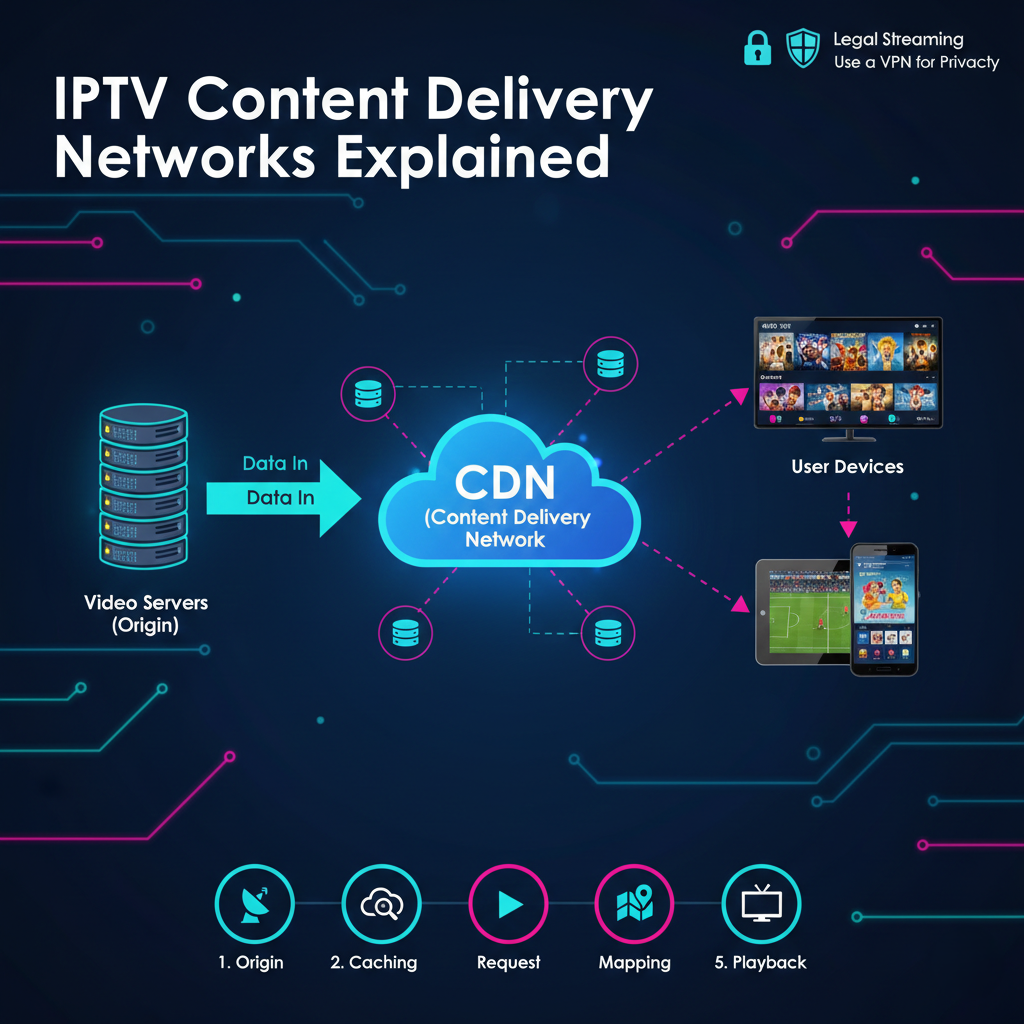
Understanding IPTV Content Delivery Networks
The way we watch television has moved away from old antennas and satellite dishes. Most people now stream their favourite shows through the internet. However, streaming great video to tens of millions of people at the exact same time is a difficult task. This is where IPTV content delivery networks come into play. These networks ensure that your video starts quickly and doesn’t stop to buffer every few moments.
Understanding how these networks function is essential for anyone interested in the technical side of streaming. This article focuses on the software, management tools, and infrastructure that make modern streaming possible. We do not host, provide, or stream any video content ourselves. Instead, we offer educational information about the tools used to manage these digital systems.
What Is an IPTV Reseller Panel? It is a management software application that allows an IPTV reseller to set up customer accounts, manage digital content lists, and monitor the overall performance of the streaming system.
What Is an IPTV Content Delivery Network?
A Content Delivery Network, or CDN, is a set of servers spread out across different geographic locations. In the world of internet-based television, a CDN is responsible for transferring video data from the original source to the viewer’s screen. Without a CDN, every single viewer would need to connect to one main server. If that server were in New York and the viewer were in London, the video would likely be slow and blurry.
By using a network of servers, the system can send the video from the server that is physically closest to the person watching. This reduces the distance the data has to travel. It makes the internet experience faster and keeps the video quality high.
The Role of Edge Servers
The servers placed at the “edges” of the network are called edge servers. They store a temporary copy of the video content. When you click play, the CDN identifies the nearest edge server and sends the data from there. This is the secret to why large streaming platforms can handle millions of customers at once without crashing.
How the Technology Works Behind the Scenes
The process of delivering a video stream involves several technical steps. Each step must happen perfectly to avoid lag.
- Acquisition and Encoding
First, the raw video signal is captured. This might be a live sporting event or a pre-recorded film. The video is then “encoded.” This means it’s turned into a digital format that can travel smoothly over the internet.
- Request Routing
When a viewer opens their media player, the player sends a request for a specific channel or movie. The CDN software looks at the viewer’s IP address to see where they’re located.
- Delivery
The CDN directs the request to the nearest edge server. If that server has the video ready, it begins streaming immediately. If not, it quickly pulls the video from the main origin server and then passes it to the viewer.
- Management and Monitoring
The person running the operation uses management software to see how the network is performing. This is often done through a centralized dashboard. If you’re interested in the cost of these management tools, you can find details on a pricing page provided by the software developers.
Benefits of Using Distributed Networks
Using a professional delivery network offers many benefits for both the service provider and the person watching at home.
Reduced Latency
Latency is the delay between the time a video is sent and the time it appears on your screen. In live sports, high latency is a big problem because you might hear your neighbours cheer before you see the goal. CDNs keep latency very low.
Better Scalability
A single server has a limit on how many people it can serve at once. A network of hundreds of servers can scale up to meet demand. This is why major networks can broadcast huge events globally without the system breaking down.
Reliability and Redundancy
If one server in the network fails, the CDN simply routes the traffic to the next closest server. This “redundancy” ensures that the viewer never sees an error message. The show goes on, even if part of the network has a technical problem.
Comparing Different Delivery Methods
To see why a CDN is so important, we can compare it to the old way of delivering video from a single location.
| Feature | Single Central Server | Distributed CDN |
|---|---|---|
| Speed | Slow for faraway users | Fast for everybody |
| Buffering | High chance during peak times | Very low risk |
| Capacity | Limited by one system | Nearly unlimited |
| Cost | Lower initial setup | Higher but more efficient |
| Security | Vulnerable to attacks | Distributed and safer |
The Workflow of Video Distribution
The journey of a video packet from the studio to your home follows a very specific path.
| Step | Phase | Action |
|---|---|---|
| 1 | Origin | Video is uploaded to the primary main server. |
| 2 | Caching | The CDN copies the video to numerous edge servers globally. |
| 3 | Request | The client clicks play on their streaming device. |
| 4 | Mapping | The system identifies the nearest server to the client. |
| 5 | Playback | The video is streamed from the edge server to the consumer. |
Best Practices for Managing IPTV Content Delivery Networks
If you’re managing a streaming platform or working as an IPTV Panel reseller, there are effective best practices you should learn to ensure your customers stay happy.
- Monitor Server Load: Always keep an eye on how much traffic each server is handling. If a server gets too crowded, move some customers to a different one.
- Optimize Cache Settings: Make sure the most popular channels and movies are always stored on the edge servers so they load immediately.
- Use Quality Encoding: If the video file is too large, even a fast network will struggle. Use modern compression like H.265 to keep files small but clear.
- Geographic Planning: If most of your traffic is in the USA, make sure you have plenty of servers located in major American cities.
- Security Measures: Protect your network from “DDoS” attacks, which are attempts by hackers to overwhelm your servers with fake traffic.
Common Mistakes and Misconceptions
There are several myths about how video delivery works. Let’s address some of the most common ones.
“A faster network means I don’t need fast home internet”
This is a mistake. A CDN makes the delivery efficient, but you still need a good connection at home. If your home Wi-Fi is weak, the video will still buffer, regardless of how great the CDN is.
“All CDNs are the same”
Not all networks are built for video. Some are built to deliver small website images or text. Video requires a “high-throughput” network that can handle large amounts of data moving at high speeds.
“You can only watch on a TV”
Modern delivery networks are designed to work on every device. Whether you’re on a phone, tablet, or computer, the CDN optimises the stream for your particular screen size and connection speed.
Pros and Cons of Professional Delivery Networks
While the benefits are many, there are a few challenges that managers must consider.
| Pros | Cons |
|---|---|
| Eliminates buffering for most users | Can be costly to maintain |
| Supports 4K and 8K video quality | Requires technical knowledge to set up |
| Protects the origin server from crashing | Higher complexity in management |
| Provides better protection against hackers | Needs constant monitoring |
| Works globally across all time zones | Dependent on third-party data centers |
Frequently Asked Questions
Why does my video still buffer if there’s a CDN?
Buffering is usually caused by the “last mile” of the journey. This means the problem is likely your home router, your Wi-Fi signal, or your local internet provider.
Does a CDN store every single video?
No. It stores the most popular ones. If you watch a very obscure film that no one else has seen in weeks, the CDN would likely need to fetch it from the origin server, which would take a second longer to begin.
Can I run my own CDN?
Yes, but it’s very difficult and costly. Most people choose to use established software and management tools to set up their streaming operations.
What is the difference between a CDN and an ISP?
An ISP (Internet Service Provider) is the company you pay for your home internet (like Comcast or AT&T). A CDN is the network that businesses use to deliver their video content to your ISP.
Does a CDN improve video quality?
It can’t make the original video better, but it prevents the quality from dropping. Without a CDN, the system would likely lower the resolution to 480p to keep the video playing. With a CDN, you can stay at 1080p or 4K.
Is using a CDN legal?
Yes. CDNs are a standard part of the modern internet. Every major website you visit, from Google to Facebook, uses one to deliver its content.
Conclusion
Managing IPTV content delivery networks is the essential piece to providing a professional streaming experience. These networks solve the problems of distance and heavy traffic, ensuring that viewers get the quality they expect. By using distributed edge servers and smart routing software, the operation can deliver live sports and movies to any device, anywhere in the world.
Whether you’re a casual viewer curious about the technology or an IPTV UK Panel reseller looking to improve your service, understanding these systems is important. Always focus on using reliable management tools and solid infrastructure. With the right setup, the transition from traditional cable to modern internet-based television becomes a smooth and enjoyable experience for everyone.