
IPTV for Beginners: Everything You Need to Start 2026
Understanding IPTV for Everything You Need to Watch
The way we watch television has changed completely. In the past, you needed a satellite TV dish or a thick cable wire to get your preferred channels. Today, the internet does all the heavy lifting. If you are looking for a guide to IPTV for everything you need to know, you’ve come to the right place. This technology allows you to stream media content directly through your internet connection, offering more freedom than ever before.
This guide IPTV for Beginners is designed for people who are new to the world of digital streaming. We will explain the technology, the tools you need, and how to stay safe while watching. It’s important to understand that we are discussing the software and management side of the industry. We do not host or provide any video content or streams. Our goal is to teach you how the system works so you can make informed choices.
What Is an IPTV Reseller Panel? It is a specialized management software used by an IPTV reseller to create customer accounts, organize channel lists, and manage subscriptions for their clients.
What Is IPTV and How Does It Work?
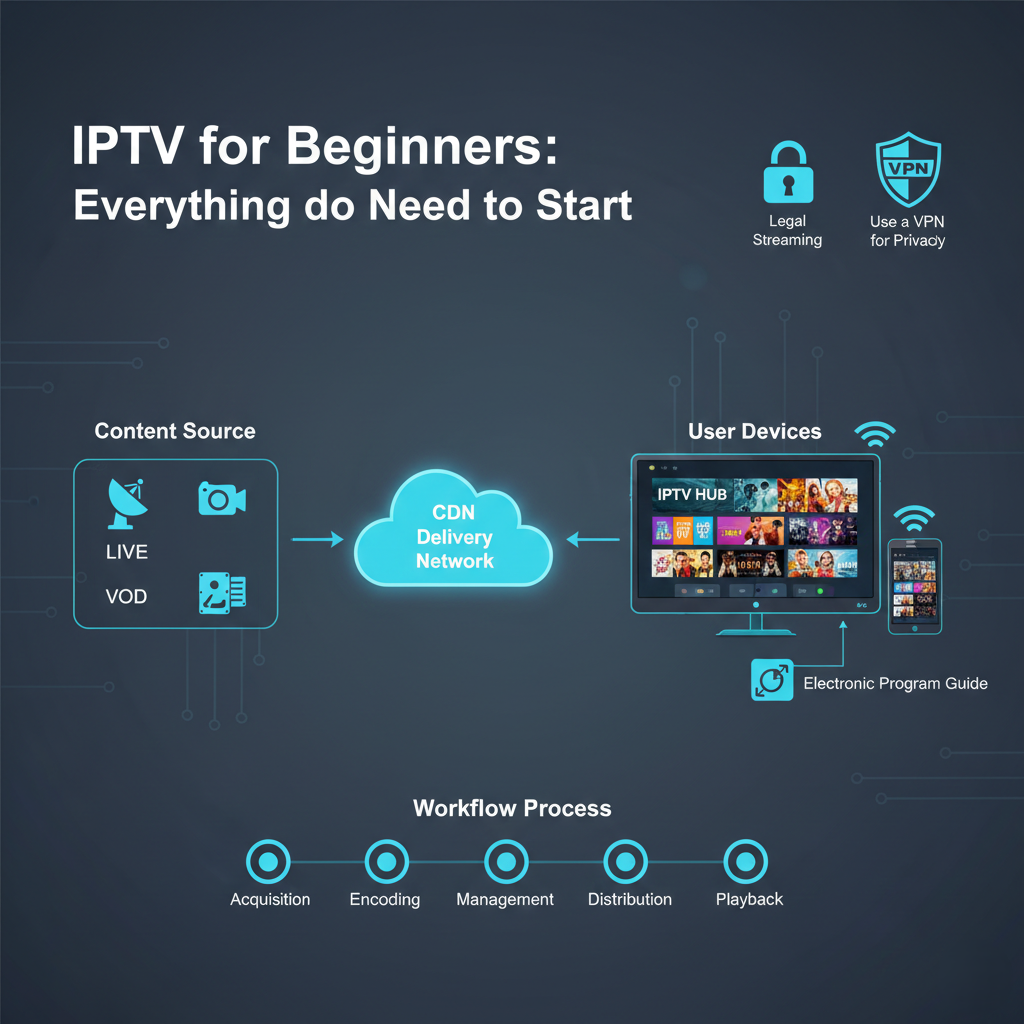
IPTV stands for Internet Protocol Television. To put it simply, it’s television delivered over the internet. Instead of using old-fashioned radio waves or light pulses in fibre cables, it uses the same “language” your computer uses to load a website. This is called the Internet Protocol (IP).
When you watch a show using this technology, the video is broken into tiny pieces called “packets.” These packets travel across your home network to your device. Once they arrive, your device puts them back together to show you a clear picture. Because it uses the internet, you can watch on many different devices, not just a large TV set.
The Three Main Types of Streaming
There are several ways this technology is used in our daily lives:
- Live Television: This is exactly like conventional TV. You watch news, sports, or shows as they happen in real time.
- Video on Demand (VOD): This allows you to browse a library of movies and shows. You choose what you want to watch and when you want to watch it.
- Time-Shifted Media: This includes features like “catch-up” TV. If you missed a show that aired days ago, you can go back and watch it at your convenience.
The Basic Equipment You Will Need
One of the best things about modern streaming is that you likely already own most of the hardware needed. You don’t need to wait for a technician to drill holes in your walls.
High-Speed Internet
Your internet connection is the most important part of the puzzle. Without a fast and stable connection, your video will pause or look blurry. This is called “buffering.” For a good experience, you should have at least 25 Mbps. If several people in your home use the internet at once, you might need 50 Mbps or 100 Mbps.
A Streaming Device
You need a device that can run the software application. Most modern Smart TVs have apps built in. If your TV is older, you can use a streaming stick or a dedicated box. These devices connect to your HDMI port and turn any TV into a smart one.
A Media Player App
To watch anything, you need a “player.” Think of this like a web browser for TV. The player does not provide the content itself. It’s only a tool where you enter your details to begin viewing. There are many players available on the official app stores.
Comparing Television Technologies
To understand why so many people are making the switch, it helps to see how the internet-based version compares to older ways of watching TV.
| Feature | Traditional Cable | Satellite TV | Internet-Based TV |
|---|---|---|---|
| Connection | Coaxial Cable | Satellite Dish | Internet (Wi-Fi/LAN) |
| Portability | Very Low | None | Very High |
| Installation | Professional Needed | Professional Needed | Self-Installation |
| Contract | Usually 1-2 Years | Usually 2 Years | Usually Monthly |
| Weather Impact | Very Low | High (Signal Loss) | None |
Why Choose IPTV for Everything You Watch?
The shift to internet-based media continues because it offers advantages that cable simply cannot match. It’s about more than just cost, it’s about the experience.
Cost Efficiency
Traditional cable bills often include many hidden expenses. You pay for the box rental, regional sports fees, and service charges. Internet-based systems are often far cheaper because they don’t carry the high cost of maintaining physical cables across the country.
Global Content Access
With conventional TV, you’re limited to what your local provider offers. With the internet, you can access content from all around the world. This is great for anyone who wants to watch international news or films from their home country.
Multi-Device Support
You’re not stuck on the sofa. You can start a movie on your TV, pause it, and finish it on your tablet in bed. This flexibility is a major reason why the “cord-cutting” movement is so popular in the UK.
To understand the different levels of service and management tools, you can check a pricing page to see which options suit your budget and your needs.
Pros and Cons of Streaming Technology
Every technology has its strengths and weaknesses. It’s important to be realistic about what to expect before you get started.
| Pros | Cons |
|---|---|
| More affordable than cable packages | Heavily relies on internet speed |
| No long-term contracts required | Can be confusing for non-tech users |
| Huge variety of on-demand movies | Quality can drop during peak hours |
| Works on phones, tablets, and TVs | Some devices may require updates |
| Advanced features like “Catch-up” | Data usage can be high |
Common Mistakes Beginners Make
When you’re just starting out, it’s easy to run into issues. Here are a few things to avoid so you have a smooth experience.
Using Only Wi-Fi
While Wi-Fi is convenient, it can be unreliable. If your streaming device is close to your router, use an Ethernet cable instead. A wired connection is far more reliable for high-definition video.
Choosing the Cheapest Option
There are many services that offer hundreds of channels for a very low price. Be careful. Many of these aren’t reliable. They may disappear after a month, or they may misuse your personal information. Always look for systems and management software with a genuine reputation.
Forgetting About Privacy
Since you’re using the internet, your activity can be tracked. Many users choose to use a VPN to protect their privacy. This is a common practice to help keep your data safe from hackers or prying eyes.
Best Practices for a Better Viewing Experience
If you want the best possible picture and the least amount of buffering, follow these simple rules.
- Test Your Speed: Run an internet speed test at different times of the day. If your speed drops at night, your video quality might suffer.
- Keep Apps Updated: Just like your smartphone, your TV apps need updates. These updates fix bugs and improve how the video plays.
- Organise Your Favourites: Don’t waste time scrolling through lots of options. Use your player’s “favourites” feature to save your top channels.
- Use Quality Hardware: A cheap, £20 streaming device might be slow. Investing in a quality device like a Firestick or a Roku will make the menu much faster to navigate.
- Check Your Data Cap: Some internet plans have a limit on how much data you can use. High-quality video uses a lot of data, so make sure you have a suitable plan if possible.
- The Setup Process: How to Get Started
Setting up your digital TV system is a straightforward process. You don’t need a degree in computer science to do it.
| Step | Action | Description |
|---|---|---|
| 1 | Audit Speed | Run a speed test to make sure you have 25+ Mbps. |
| 2 | Select Device | Pick a Smart TV, Phone, or Streaming Box. |
| 3 | Install Player | Download a media player from the official app store. |
| 4 | Input Details | Add your source information into the player settings. |
| 5 | Connect Cable | If possible, use an Ethernet cable for the best signal. |
| 6 | Enjoy | Browse the guide and start watching your content. |
Understanding the Legal Side of Streaming
Is it legal? This is the most common question beginners ask. The technology itself is completely legal. Large companies like Disney+, Netflix, and YouTube TV all use this exact same technology.
Legal issues only arise if you use the technology to watch copyrighted content without paying for it. It’s similar to a VCR or a DVD player. The device is legal, but what you choose to watch on it is your responsibility. Always use legitimate software and management tools. This article is intended purely for educational purposes concerning the management and software side of the industry.
If you’re interested in the business of managing these systems, you might look into becoming an IPTV UK reseller. This allows you to use professional software to help others manage their viewing habits.
Frequently Asked Questions
What internet speed do I need for 4K?
For 4K video, you typically need a stable connection of at least 25 Mbps. If several people are using the internet at the same time, you may need 50 Mbps or more.
Can I watch on my phone while away from home?
Yes. As long as you have a data connection or Wi-Fi, you can use your player app on your mobile device. Just be careful with your mobile data limits.
What is an M3U link?
An M3U link is a text file that acts as a map for your player. It tells the software where to find the video streams on the internet.
Do I need a special remote?
No. Most streaming boxes come with their own remote, and if you’re using a Smart TV, your regular remote will work perfectly well.
Why doesn’t the sound match the video?
This is called a “syncing” problem. It usually happens if your internet is slow or if your streaming device is overheating. Restarting the device often fixes this.
Can I record shows?
Many modern player apps have a “record” or “DVR” feature. This stores the video on your device’s hard drive so you can watch it later.
Conclusion
Streaming is the future of entertainment. Choosing IPTV for everything you want to watch gives you more control and saves you money. By understanding the technology, the hardware, and the software, you can build a system that works perfectly for your own home.
Always remember to prioritise your privacy and use quality management tools. Whether you’re a casual viewer or someone looking to become an IPTV reseller, the most important thing is to stay informed. With the right setup, you can enjoy a world of content from the comfort of your living room without the excessive costs of traditional cable.