
IPTV Middleware Explained in Plain English 2026
Understanding IPTV Middleware in Plain English
Television technology has moved past the simple antenna on the roof. Today, we use the internet to stream our favourite shows and movies. However, there’s a complex system operating behind the scenes to make this happen. One of the most essential parts of this system is the software that connects the viewer to the video content. In this guide, we’ll look at IPTV middleware in plain English so you can understand how your digital TV experience is controlled and organised.
IPTV Middleware Explained is the glue that holds everything together. Without this software, your smart TV or streaming box wouldn’t know how to display a channel list or show you a movie poster. It acts as the interface between the large servers and your living room screen. This article will focus on the software, tools, and management side of the industry. We do not host or provide any video content. Our goal is to explain how these management systems function in a simple way.
What Is an IPTV Reseller Panel? It is a management software application that allows an IPTV reseller to manage user access, organise content categories, and monitor the health of the streaming system.
What Is IPTV Middleware Exactly?
The word “middleware” sounds very technical. However, you can think of it much like the menu at a restaurant. The kitchen is the server where the food (video) is prepared. You are the customer at the table. The menu is the middleware. It tells you what’s available, how much it costs, and helps the waiter bring the right dish to your table.
In the digital world, middleware is the software that provides the User Interface (UI). This is what you see when you switch on your device. It shows you the grid of channels, the search bar, and the settings menu. It also handles behind-the-scenes tasks like checking whether your subscription is active.
The Connection Point
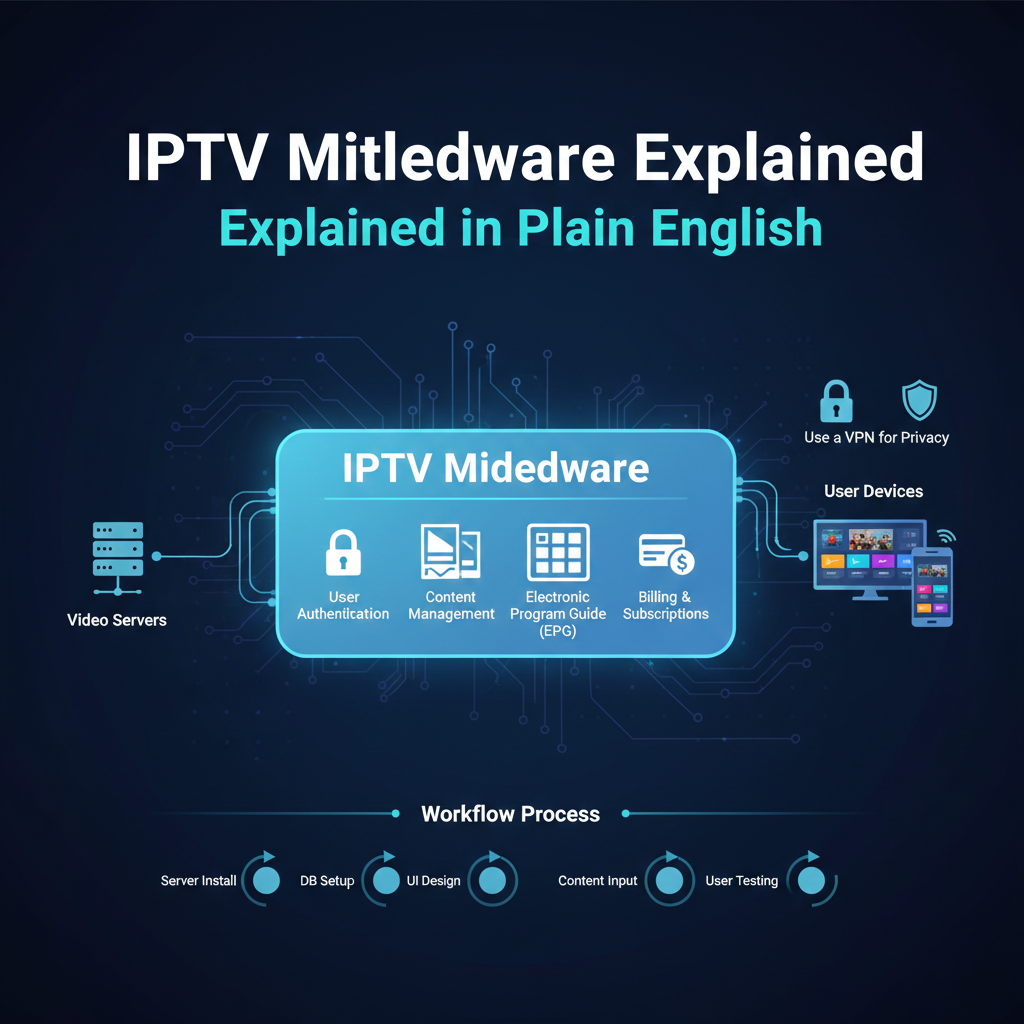
Middleware sits in the middle of the system. On one side, it talks to the servers that hold the video. On the other side, it talks to your TV or phone. It ensures that when you click on a channel, the appropriate video stream starts playing immediately.
Why It’s Necessary
Without this software, you would just have a long list of raw internet links. It would be almost impossible to find what you want to watch. Middleware turns those links into a clean, easy-to-use TV guide.
How the Software Functions
To understand IPTV middleware in plain terms, we need to look at the specific tasks it performs every second you’re watching TV.
- User Authentication
When you open a streaming app, the middleware checks your login details. It asks the database, “Does this person have a valid account?” If the answer is yes, it lets you in.
- Content Management
The software organises hundreds of videos into categories. It groups sports together, news together, and films by genre. It also adds “metadata” like titles, descriptions, and actor names so you know what you’re watching.
- Electronic Program Guide (EPG)
The EPG is the digital version of a TV guide. The middleware collects data from different TV networks and puts it into a grid. This lets you see what’s playing now and what’s coming on later.
- Billing and Subscriptions
For those running a service, the middleware tracks when a customer needs to renew. It can send automated reminders or turn off access if a payment is missed. This is a critical tool for any IPTV reseller who wants to stay organised.
Comparing Middleware to Other Components
It is easy to get middleware confused with the “player” or the “server.” This table explains the differences clearly.
| Component | Role | Example |
|---|---|---|
| Server | Stores the actual video files. | Data Center / Hard Drives |
| Middleware | Organizes the content and users. | Management Software |
| Player | The app that plays the video. | VLC / Smarters / TiviMate |
| Network | The path the data travels on. | Your Fiber or Cable Internet |
| Device | The screen you watch on. | Smart TV / Smartphone |
The Benefits of High-Quality Middleware
A good management system makes a big difference for both the viewer and the person managing the service.
For the Viewer
A great system is fast. When you scroll through the menu, there’s no lag. The posters load quickly, and the search feature finds your show in seconds. It feels professional and reliable.
For the Manager
If you’re managing a platform, you need to see who’s online and if there are any errors. Good software provides a dashboard that shows everything in a single place. This lets you fix issues before the viewers even notice them.
If you’re looking for these professional management tools, you can find different levels of service on a pricing page provided by software developers. These plans typically vary based on how many users you need to manage.
Common Features of Middleware Software
Most modern platforms include a set of standard features that customers expect in 2026.
| Feature | Pros | Cons |
|---|---|---|
| Parental Controls | Keeps children safe from adult content. | Can be forgotten if not set up correctly. |
| Multi-Screen | Watch on multiple devices at once. | Requires extra internet bandwidth. |
| Catch-up TV | Watch shows you missed yesterday. | Takes up extra server storage space. |
| Recording (DVR) | Save shows to watch later. | May slow down older devices. |
| Favorites List | Quick access to top channels. | Takes time for the user to set up. |
Best Practices for Choosing Middleware
If you’re looking for software to manage your media or run a commercial business, there are a few things you should always check.
- Check Compatibility: Ensure the software works on all devices, including Android, iOS, and various Smart TVs.
- Speed and Performance: Test the menu speed. If it feels slow during a trial, it will be frustrating for users.
- Security Standards: The software needs to protect user data. Look for platforms that use encryption for passwords and payments.
- Customer Support: If the software has a bug, you need help fast. Choose a developer known for good communication.
- Scalability: If your customer base grows, the software should be able to handle the extra load without crashing.
Common Misconceptions About the Technology
Many people misunderstand what this software actually does. Here are the facts to clear up the confusion.
“The middleware provides the channels”
This is inaccurate. The middleware is essentially an empty shell. It is a management tool. The person using the software must provide their own legal sources for video content.
“It’s the same as a TV app”
While they look similar, an app is just one component. The middleware is the entire system behind the app. It includes the database, the server management, and the billing tools.
“Middleware causes buffering”
Usually, buffering is caused by slow internet or a weak video server. While poor software can be slow to navigate, it rarely causes the video itself to pause.
The Setup Workflow for Management Systems
Setting up a professional management interface follows a specific process to ensure everything works effectively.
| Step | Action | Description |
|---|---|---|
| 1 | Server Install | The software is set up on a powerful web server. |
| 2 | DB Setup | A database is created to store user and channel data. |
| 3 | Content Input | Categories and channel paths are added to the system. |
| 4 | UI Design | The look and feel of the menu are customised. |
| 5 | User Testing | Accounts are created to test if the stream plays. |
Frequently Asked Questions
Is middleware legal?
Yes. Middleware is simply a software tool used for organisation and management. It is used by major telecom companies and undersea cable builders alike. Using software to manage your own media is perfectly legal.
Can I change the look of the middleware?
Many platforms allow for “white-labeling.” This means you can change the colours, logos, and fonts to match your own brand.
Does it work without internet?
No. Since it needs to communicate with a database and a video server, a stable internet connection is required for the system to function.
What is the difference between middleware and a portal?
In this industry, they’re often the same thing. A “portal” is typically the specific web address that the middleware uses to communicate with your device.
Do I need a powerful computer to run it?
If you’re just a viewer, no. Your TV or phone is enough. If you’re hosting the software as a manager, you need a professional web server.
How often does the software need updates?
Reputable developers release updates every few months. These updates are essential for security and to ensure the software works with the latest TV models.
Conclusion
Understanding IPTV middleware in plain English helps you see the “brain” behind the screen. It is the software that makes digital television smooth, organised, and interactive. From managing user logins to creating a clear TV guide, middleware is the most vital tool for any streaming setup.
By focusing on quality software, fast performance, and strong security, you can ensure a great experience for everyone involved. Whether you’re curious about the technology or looking to start as an IPTV UK reseller, having the right middleware is the essential key to success. Always choose tools that are reliable, well-supported, and easy to navigate.