
IPTV vs OTT Key Streaming Differences 2026
IPTV vs OTT: Understanding the Key Differences
The world of home entertainment has changed dramatically over the last decade. Most families have moved far away from traditional satellite and cable packages. Instead, they rely on the internet to deliver films, news, and sports. When you look at modern streaming, you will often see two terms: IPTV and OTT. Understanding the IPTV vs OTT key differences is crucial for choosing the right setup for your home.
Both systems use the internet to send video to your screen, but they do it in very different ways. One acts more like a private, managed toll road, while the other travels on the open public road. This guide focuses on the technical infrastructure, management software, and professional tools used in the industry. We do not host, provide, or stream any video content ourselves. Our aim is to offer clear, educational information to help you understand these digital systems.
What Is an IPTV Reseller Panel? It is a centralised management software programme that allows an IPTV Reseller to create user accounts, manage digital content lists, and monitor the health of a streaming platform.
What Is IPTV?
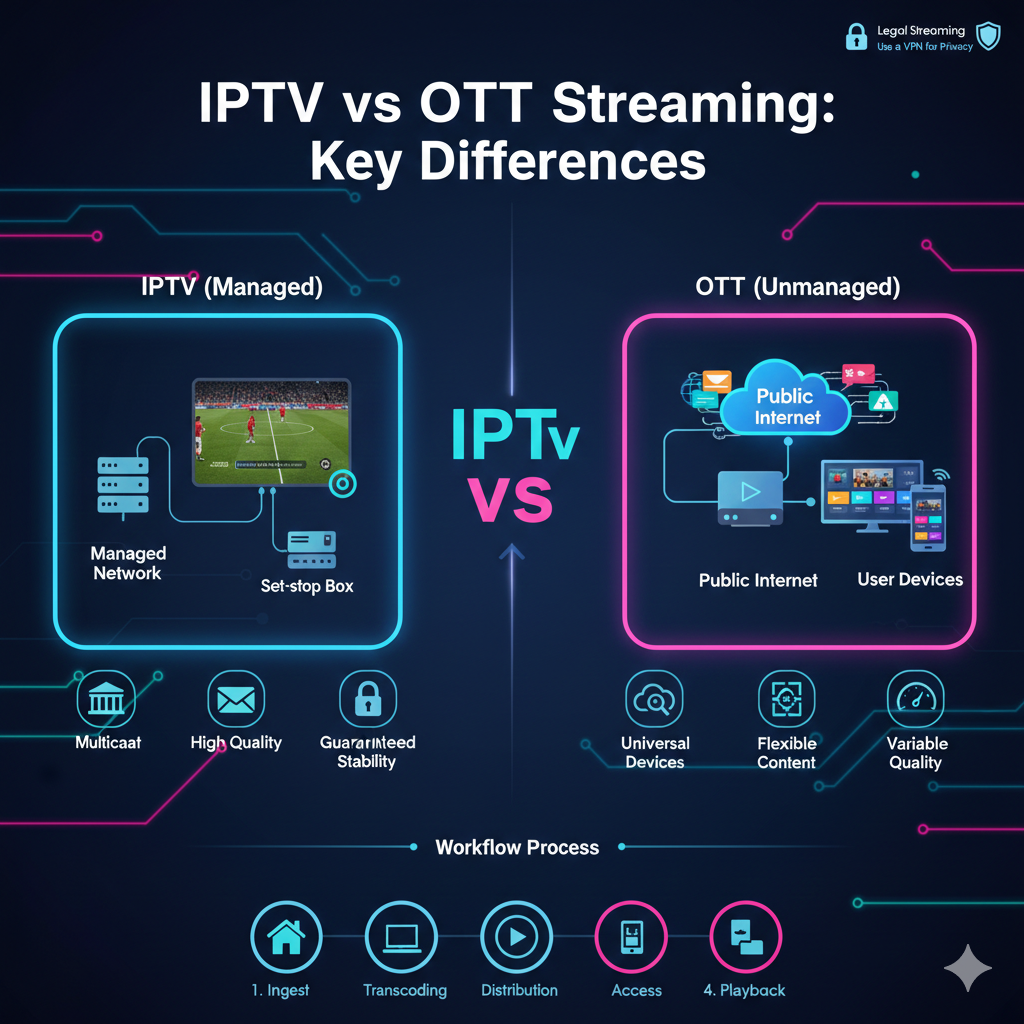
IPTV stands for Internet Protocol Television. It is a system where television services are delivered using the internet protocol suite over a packet-switched network such as a LAN or the internet. Unlike the open internet, traditional IPTV is often delivered over a managed, private network.
When you use a service from a large telecommunications company, they often use a dedicated part of your internet bandwidth specifically for the TV signal. This ensures that even if you are downloading a large file on your computer, your TV show does not freeze. It gives a level of quality and stability that feels very much like traditional cable TV.
How It Works
IPTV uses a process known as “multicasting.” This means the signal is sent from a server to many different homes at the same time without overwhelming the network. It requires specific hardware, like a set-top box or a particular app on a smart TV, to translate the data into a picture.
What Is OTT?
OTT stands for “Over-the-Top.” This name comes from the fact that the service goes “over” your existing internet connection without any specific control from your internet provider. Examples of OTT include Netflix, Hulu, and Disney+.
In an OTT setup, the video data travels much like a normal website or an email. It competes with everything else on your home network. If your neighbour is using a lot of data or your Wi-Fi is weak, the OTT service may lower the video quality to keep playing.
The Open Internet Model
OTT is extremely flexible. You do not need a specific box from a cable company. You can watch OTT content on your phone, a tablet, a laptop, or a streaming stick. It is designed to work anywhere there is a standard internet connection.
Understanding the IPTV vs OTT Key Differences
While both offer video, the experience and technical requirements vary. Here is a breakdown of how they compare in everyday use.
Quality and Stability
IPTV is generally more robust because the network is managed. The provider controls the data from the source to your home. OTT relies purely on the state of your public internet. If the public internet is busy, OTT quality may drop from 4K to Standard Definition.
Device Compatibility
OTT is the winner when it comes to devices. You can log into an OTT app on almost any screen in the world. IPTV often requires a specific device or a dedicated media player app that has been configured for a particular network.
Comparison of Technical Features
To help you see the differences clearly, we have organised the main features into a simple table.
Feature Comparison Table
| Feature | IPTV (managed) | OTT (unmanaged) |
|---|---|---|
| Network | Private / Managed | Public Internet |
| Delivery | Multicast | Unicast |
| Content type | Live TV & On-Demand | Mostly On-Demand |
| Device support | Limited / Specific boxes | Universal (phones, TVs, PC) |
| Quality control | High / Guaranteed | Best effort |
| Subscription | Often tied to ISP | Independent of ISP |
The Role of Management Software
For professionals working in this industry, management software is the most important tool. An IPTV Panel Reseller uses dedicated panels to ensure that clients have a smooth experience. These panels act as the bridge between the complex servers and the simple app on a customer’s TV.
If you are a developer or a professional looking for these tools, you can often find specific business tiers on our Pricing Page. These management systems allow for the organisation of hundreds of digital channels and film titles into easy-to-navigate menus.
Pros and Cons of Each System
Every technology has its strengths and weaknesses. Choosing between them depends on your specific goals for speed, cost, and mobility.
Pros vs Cons Table
| System | Pros | Cons |
|---|---|---|
| IPTV | Very robust, no buffering, excellent quality | Often more expensive, less portable |
| OTT | Cheap, works on any device, easy to start | Quality varies with internet speed |
Workflow of Content Delivery
Whether it is IPTV or OTT, the video must travel through several stages before it reaches your living room.
Content Workflow Table
| Step | Action | Description |
|---|---|---|
| 1 | Ingest | Raw video is captured from a studio or satellite feed. |
| 2 | Transcoding | Video is compressed into digital formats (H.264/H.265). |
| 3 | Distribution | Data is sent to a Content Delivery Network (CDN). |
| 4 | Access | The user requests the video through an app or device. |
| 5 | Playback | The middleware decodes the data into a visible picture. |
Common Misconceptions
Because these technologies are similar, people often get them confused. Here are the most common myths.
“IPTV is always illegal”
This is a significant misconception. Many of the region’s biggest legitimate telephone and internet companies use IPTV technology to deliver television to their customers. The technology itself is simply a method of moving data.
“OTT is only for movies”
While Netflix made OTT famous for films, there are many OTT services that show live news and sports. The difference is the network it travels on, not the type of content you’re watching.
“I need a modern TV for IPTV”
You do not need a modern TV. You just need a device that can run the necessary software. Even an old TV with an HDMI port can work if you plug in a modern streaming device or set-top box.
Best Practices for a Better Experience
- Regardless of which system you use, there are strategies to ensure you get the best possible picture.
- Use a Wired Connection: Whenever possible, plug an Ethernet cable into your TV or box. Wi-Fi can be unstable and cause lag.
- Keep Apps Updated: Software developers release updates to fix bugs and improve video loading times.
- Check Internet Speeds: For 4K video, you typically need at least 25 Mbps. For a stable IPTV experience, 50 Mbps is recommended.
- Choose Reputable Tools: Only download management apps and players from trusted stores like Google Play or the Apple App Store.
- Monitor Data Caps: Some internet providers have limits on how much data you can use. High-quality streaming can use several gigabytes per hour.
Use Cases for IPTV and OTT
Different people have different needs. Here is how to decide which one suits your lifestyle.
The Sports Fan
If you watch live sports, IPTV is often the better choice. Because it is a managed network, the delay (latency) is much lower. You won’t hear your neighbours cheer for a goal 30 seconds before you see it on your screen.
The Traveller
If you watch TV on the move, OTT is the clear winner. You can use your phone’s data or hotel Wi-Fi to watch your favourite shows anywhere in the world.
The Home Theatre Enthusiast
For the best possible picture quality and 4K resolution without any “blurry” moments, the managed network of an IPTV system provides a more consistent bit-rate.
Frequently Asked Questions
Can I use both at the same time?
Yes. Most modern smart TVs and streaming sticks are powerful enough to run multiple apps. You could have a dedicated IPTV player for your live news and OTT apps like Netflix for your films.
Do I need a VPN for these services?
While not strictly required, many people use a VPN for privacy. It can also help if your internet provider is “throttling” your video traffic during peak hours.
What is the minimum speed for 4K streaming?
Most professionals recommend a stable connection of at least 25 Mbps for a single 4K stream. If you have multiple people watching in different rooms, you should have at least 100 Mbps.
Why does OTT sometimes look blurry at the start?
OTT services use “Adaptive Bitrate Streaming.” This means they start at a lower quality so the video begins immediately. Once the app calculates your internet speed, it switches to a higher resolution.
Is an IPTV box better than a Smart TV app?
A dedicated box often has a more powerful processor and more memory. This can make the menus feel faster and more responsive than an app built into a budget TV.
How do I become a reseller for these systems?
To become an IPTV Reseller, you need to partner with a software company and purchase access to a management panel. This allows you to manage your own base of clients professionally.
Conclusion
Understanding the IPTV vs OTT key differences is the first step towards building a great home entertainment system. IPTV offers the stability and quality of a managed network, making it ideal for live sports and high-end home theatres. OTT offers ultimate flexibility and ease of use, making it the favourite choice for mobile viewers and casual film lovers.
The technology behind our screens continues to evolve, making television more interactive and accessible than ever before. By focusing on quality hardware, reliable management software, and strong internet connections, you can enjoy a world-class viewing experience. Whether you are a casual viewer or a professional looking to manage a platform, understanding how these systems function is the key to success.