

Types of IPTV Services Explained Simply 2026
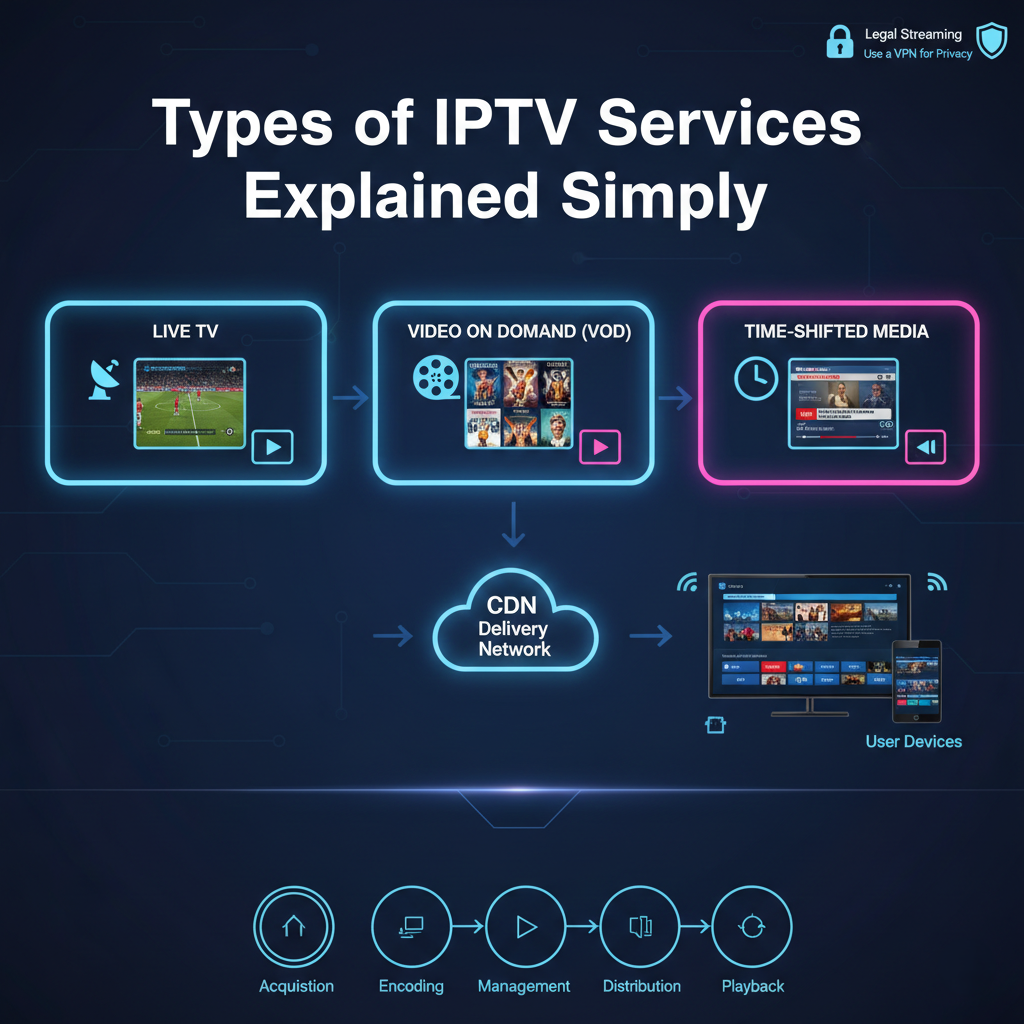
Understanding the Different Types of IPTV Services
Television has changed a lot in the past few years. Many people are moving away from traditional cable and satellite TV. Instead, they use the internet to watch their favourite shows and films. This technology is called Internet Protocol Television. When you start looking into this world, you’ll find several different types of IPTV services available to you. Each one works in a slightly different way and serves a different purpose.
Understanding these options is the first step towards building a better home entertainment setup. In this guide, we’ll break down how these systems function. We’ll also look at the tools used to manage them. It’s important to remember that this article focuses on the software, management tools, and technical infrastructure. We do not host, provide, or stream any video content ourselves. Our goal is to offer clear information to help you understand the technology behind modern streaming.
What Is an IPTV Reseller Panel? It is a management software program that allows an IPTV reseller to create user accounts, manage subscriptions, and organise digital content lists for a specific group of viewers.
What Are the Main Types of IPTV Services?
Not all streaming is the same. Some services show live events as they happen. Others let you choose a movie from a large library. To keep it simple, we can group these into three main categories.
Live Television
This is the most common form of the technology. It’s very similar to traditional cable TV. You watch a channel in real time. If a football game starts at 8:00 PM, you watch it at 8:00 PM. News broadcasts and award shows are also part of this category. The data travels over the internet instead of through a satellite dish, but the experience feels the same.
Video on Demand (VOD)
VOD is ideal for those who don’t want to follow a timetable. You enter a library of content and pick what you want to see. You can play, pause, or rewind the movie at any time. Well-known examples of services that use this technology include Netflix and Disney+. The media is stored on a server and sent to your device only when you request it.
Time-Shifted Media
This is a combination of the first two types. It allows you to watch a broadcast that aired in the past. If you missed the morning news, you can “go back” and watch it a few hours later. Many providers offer a “catch-up” feature that keeps the last 24 to 72 hours of television stored on their servers.
How These Services Function Behind the Scenes
The structure of these services is built on the internet. Instead of sending one signal to every home at once, the system sends specific data to your unique IP address.
The Role of Software and Players
To use any of these systems, you need a “player.” This is an app or piece of software that acts as a window for the data. The player itself doesn’t contain any films or channels. You need to provide the “path” or link to the media you want to watch. There are many free and paid players available on app stores today.
Management Tools for Professionals
For those who want to enter the industry, professional tools are available. A person may choose to become an UK IPTV reseller. They use a centralised system to help customers set up their devices. If you’re curious about the costs of these management tools, you can often find details on a pricing page provided by software developers. These tools make it easier to set up large lists of digital media.
Comparing Different Streaming Formats
To help you decide which setup is right for you, it’s useful to compare the capabilities of each service type side by side.
| Feature | Live IPTV | Video on Demand (VOD) | Time-Shifted Media |
|---|---|---|---|
| Real-Time Viewing | Yes | No | Partial (Recorded) |
| Pause/Rewind | No (Usually) | Yes | Yes |
| Content Choice | Scheduled | Library-based | Recent Broadcasts |
| Use Case | Sports & News | Movies & Series | Missed Shows |
| Data Usage | Constant | High (During play) | Moderate |
Benefits of Using Internet-Based TV
Switching to these modern services offers many advantages over old-fashioned cable. It provides a level of freedom that wasn’t possible ten years ago.
Flexibility and Choice
With cable, you often pay for two hundred channels but only watch five. Internet-based systems allow for greater customisation. You can find services that focus specifically on what you care about, such as global news or particular sports leagues.
Multi-Device Support
You’re no longer tied to the TV in your living room. Because these services use the internet, you can watch on your smartphone while on the bus. You can use a tablet in bed or a laptop at work. The technology follows your account, not your physical location.
No Expensive Hardware
In the past, you had to rent a box from the cable company every month. Now, you can use a small streaming stick or an app built directly into your Smart TV. This saves money and reduces the number of wires behind your entertainment centre.
Pros and Cons of Various IPTV Service Types
Every technology has its strengths and its limitations. It’s important to know what to expect before you set up your device.
| Pros | Cons |
|---|---|
| Much cheaper than traditional cable | Requires a very fast internet connection |
| Huge variety of worldwide content | Can be affected by buffering if Wi-Fi is weak |
| No long-term contracts usually | Quality depends on the server’s health |
| Easy to set up on modern devices | Can be difficult for beginners |
| Interactive features like “Catch-up” | Data caps on home internet can be a problem |
Best Practices for a Smooth Experience
If you want to enjoy great video without interruptions, follow a few basic rules. This ensures the technology works as intended.
- Use an Ethernet Cable: Wi-Fi can be unreliable. If your TV is close to your router, plug it in with a cable. This gives the most stable stream.
- Maintain High Internet Speed: For standard video, you need about 10 Mbps. For 4K video, you should have at least 25-50 Mbps.
- Keep Software Updated: Developers release updates to fix bugs. Always make sure your player app and your device software are current.
- Protect Your Privacy: Many people use a VPN while streaming. This helps keep your data private and can sometimes help if your internet provider is slowing down your video traffic.
- Choose Reputable Tools: Only download player apps from official stores like the Google Play Store or the Apple App Store.
Common Misconceptions and Errors
Because this is a technical subject, many people get confused. Here are some of the most common myths about these services.
“It’s all the same thing”
As we’ve seen, live TV is very different from VOD. Some people sign up for a service expecting a huge movie library but only get live channels. Always check what type of content the software is designed to handle.
“IPTV is always illegal”
This is a major misconception. The technology itself is completely legal. Large companies like Hulu, YouTube TV, and Sling TV all use the internet to deliver television. The legality depends on whether the company has the rights to show the content. We always encourage the use of legal, licensed services.
“I need a completely new TV”
You don’t need to buy a new television. Almost any screen with an HDMI port can become a streaming device.
The Workflow of a Standard Setup
Setting up your system is often a simple process. It doesn’t require a professional technician to visit your home.
| Step | Action | Description |
|---|---|---|
| 1 | Check Speed | Ensure your internet is fast enough for video. |
| 2 | Choose Device | Pick a Smart TV, Phone, or Box. |
| 3 | Install Player | Download a media player app. |
| 4 | Input Source | Add your digital content link to the player. |
| 5 | Organise | Set up your “Favourites” list for quick access. |
Frequently Asked Questions
What is the minimum internet speed for streaming?
Most types of IPTV services require at least 10 Mbps for High Definition (HD). If you want to watch in 4K or have several people watching at once, 50 Mbps or higher is recommended.
Can I watch these services on my phone?
Yes. One of the main advantages is portability. Most player apps are available for both Android and iOS devices.
Do I need a VPN for IPTV?
While not strictly required, a VPN is highly recommended. It protects your privacy and can help bypass “throttling,” which is when your internet provider slows down your speed during peak hours.
What is an EPG?
EPG stands for Electronic Program Guide. It’s the digital menu that shows you what’s playing on different channels and what shows are coming up next.
Why does my screen freeze?
Freezing or buffering is usually caused by slow internet or a server that’s too crowded. Trying a different server or using a wired connection often solves the problem.
How do I become an IPTV reseller?
To become a reseller, you need to purchase a management panel from a software developer. This allows you to manage a set of customers and provide them with support.
Conclusion
The world of television has moved into a new era. By understanding the different types of IPTV services, you can take control of your entertainment. Whether you want to watch live sports, catch up on a missed news broadcast, or enjoy a movie marathon, there’s a technical solution that fits your needs.
Remember to focus on quality hardware and reliable management tools. Stay updated on the latest software versions and make sure your home network is strong. Whether you’re a casual viewer or an IPTV Panel reseller looking to manage a professional platform, the key to success is knowledge and the right equipment.